
Ever wanted to build a great web application? And then searched for the right JavaScript framework to make the task easier?
When choosing a powerful framework to build with, we notice some things to be learned. It has a custom way to initialize the application. It has its own way to aggregate the components of the user interface. It has its own format to attach the interface logic including the event listeners. After mastering these steps we see that we’ve spent half of the time allocated for the application development. And we haven’t solved yet the aspect of code reusability. And last but not least, the best JavaScript framework to solve all these may not be so affordable.
What if I tell you that all you need to do for the previous task is writing a configuration file for your application? You will say that there are frameworks that allow this in the form of a generated XML file. But what I’m talking about applies to any framework, either old or new. And it’s written entirely in JavaScript.
Meet JUL – The JavaScript UI Language!
JUL + SmartClient Example
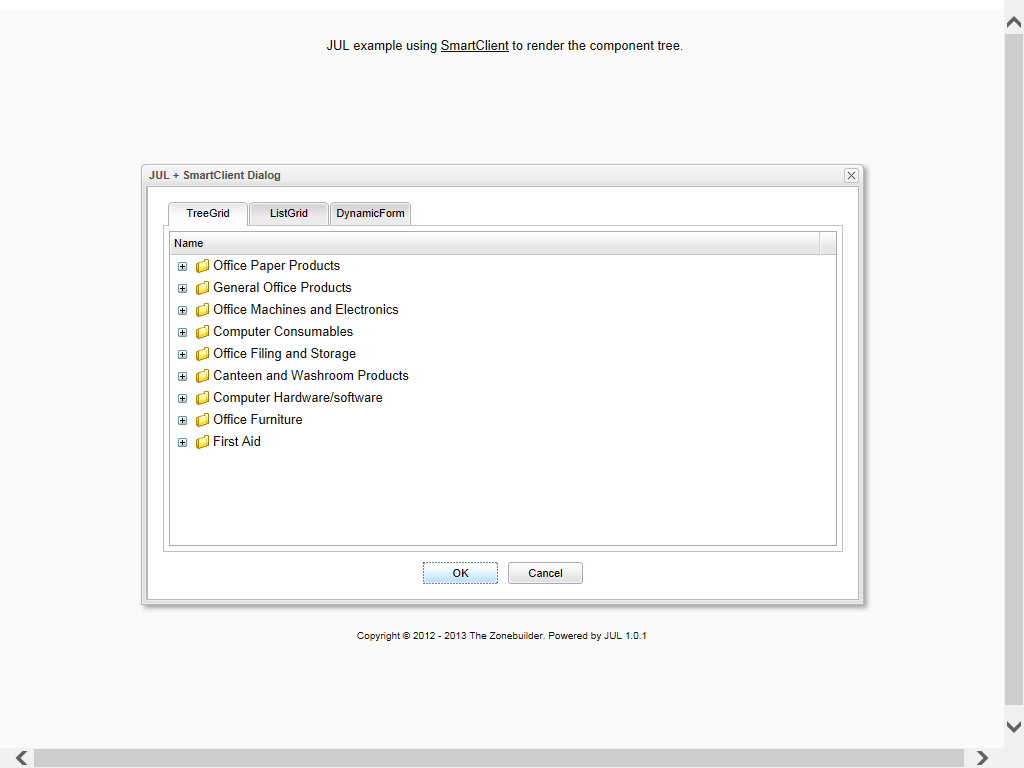 Source code:
// application instance
APP = {
	version: '1.0',
	parser: new JUL.UI.Parser({
		// SmartClient uses 'items' as container's 'children' property
		childrenProperty: 'items',
		// other properties which need to instantiate as components
		membersProperties: ['members', 'tabs', 'pane', 'dataSource'],
		// in SmartClient, IDs are automatically exposed as globals
		idProperty: 'ID',
		// simple factory to call 'create' utility if the component class is specified,
		// or to return a config object otherwise
		customFactory: function(oConfig) {
			if (oConfig.xclass === 'Object') { return oConfig; }
			else { return isc[oConfig.xclass].create(oConfig); }
		}
	}),
	// initialization method that creates the UI
	init: function() {
		this.parser.create(this.ui, this.logic);
	}
};
// layout configuration tree for the whole application
APP.ui = {
	xclass: 'Dialog',
	ID: 'mainDialog',
	title:"JUL + SmartClient Dialog",
    showShadow:true,
	autoSize: true,
	autoDraw: true,
	buttons: [isc.Dialog.OK, isc.Dialog.CANCEL],
	items: [
		{xclass: 'TabSet', width: 680, height: 350, selectedTab: 0, tabs: [
			{title: 'TreeGrid', pane: {
				xclass: 'TreeGrid',
				ID: 'supplyTree',
    			animateFolders: true,
		    	selectionType: 'single'
			}},
			{title: 'ListGrid', pane: {
				xclass: 'ListGrid',
				ID: 'supplyList',
				alternateRecordStyles: true,
		    	selectionType: 'single'
			}},
			{title: 'DynamicForm', pane: {
				xclass: 'DynamicForm',
				ID: 'supplyForm',
				numCols: 4,
				colWidths: [100, 200, 100, 200],
			    margin: 25,
				cellPadding: 5,
				autoFocus: false
			}}
		]}
 	]
};
// interface logic bounded by component IDs
APP.logic = {
	mainDialog: {
		okClick: function() {
			alert('Please fill the required info!');
		},
		cancelClick: function() {
			alert('Won\'t close for now.');
		},
		onCloseClick: function() {
			return false;
		}
	},
	supplyTree: {
			autoFetchData: true,
			loadDataOnDemand: false,
		dataSource: {
			xclass: 'DataSource',
			ID: 'supplyCategory',
			clientOnly: true,
			dataURL: '../data/supplyCategory.data.xml',
			recordXPath: '//supplyCategory',
			fields: [
				{name: 'categoryName', title: 'Item', type: 'text', length: 128, required: true, primaryKey: true},
				{name: 'parentID', hidden: true, type: 'text', required: true, foreignKey: 'supplyCategory.categoryName', rootValue: 'root'}
			]
		},
		nodeClick: function(viewer, node, recordNum) {
			supplyList.filterData({category: node.categoryName});
		}
	},
	supplyList: {
		autoFetchData: true,
		showAllRecords: true,
		dataSource: {
			xclass: 'DataSource',
			ID: 'supplyItem',
			clientOnly: true,
			dataURL: '../data/supplyItem.data.xml',
			recordXPath: '//supplyItem',
		fields: [
				{name: 'itemID', type: 'sequence', hidden: true, primaryKey: true},
				{name: 'itemName', type: 'text', title: 'Item', length: 128, required: true},
				{name: 'SKU', type: 'text', title: 'SKU', length: 10, required: true},
				{name: 'description', type: 'text', title: 'Description', length: 2000},
				{name: 'category', type: 'text', title: 'Category', length: 128, required: true, foreignKey: 'supplyCategory.categoryName'},
				{name: 'units', type: 'enum', title: 'Units', length: 5, valueMap: [
					'Roll', 'Ea', 'Pkt', 'Set', 'Tube', 'Pad', 'Ream', 'Tin', 'Bag', 'Ctn', 'Box'
				]},
				{name: 'unitCost', type: 'float', title: 'Unit Cost', required: true, validators: [
					{type: 'floatRange', min: 0, errorMessage: 'Please enter a valid (positive) cost'},
					{type: 'floatPrecision', precision: 2, errorMessage: 'The maximum allowed precision is 2'}
				]},
				{name: 'inStock', type: 'boolean', title: 'In Stock'},
				{name: 'nextShipment', type: 'date', title: 'Next Shipment'}
			]
		},
		recordClick: function(viewer, record, recordNum, field, fieldNum, value, rawValue) {
			supplyForm.setValues(record);
		}
	},
	supplyForm: {
		dataSource: 'supplyItem',
		useAllDataSourceFields: true
	}
};
// avoid automatic rendering if 'autoDraw' not specified
isc.setAutoDraw(false);
// start the application
APP.init();
JUL + YUI Example
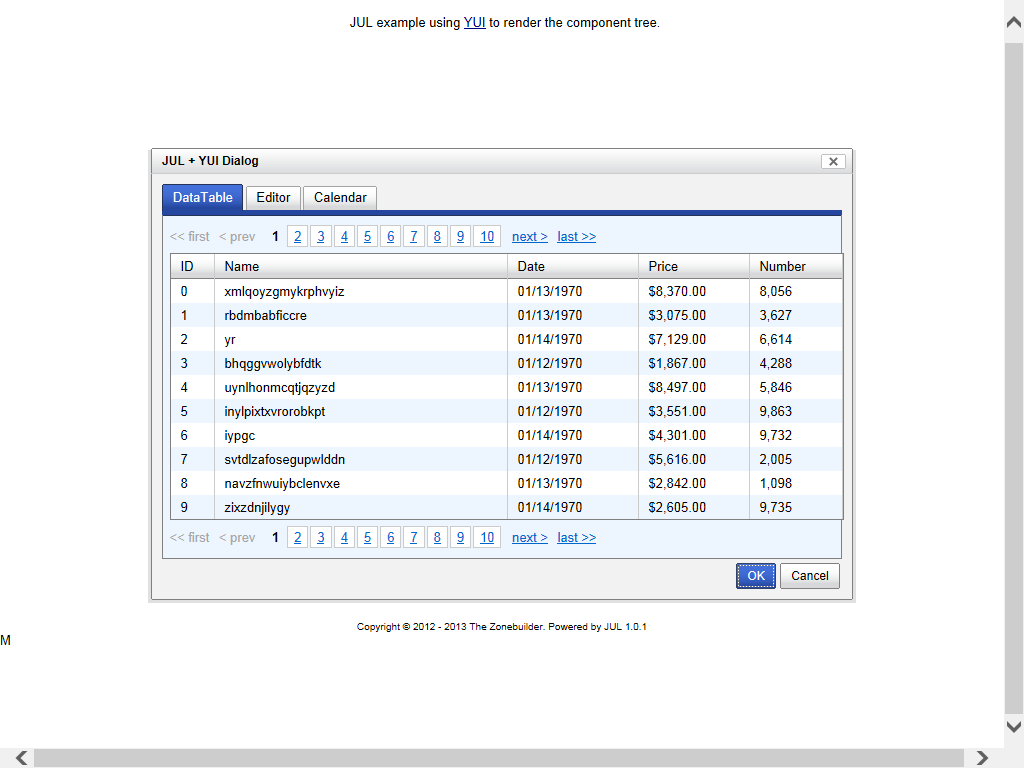 Source code:
(function() {
// configuring YUI Loader to load dependencies from CDN
var oLoader = new YAHOO.util.YUILoader({
    base: 'https://ajax.googleapis.com/ajax/libs/yui/2.9.0/build/',
	require: ['reset-fonts', 'container', 'button', 'tabview', 'datatable', 'editor', 'calendar'],
    loadOptional: true,
    // will fire APP.init method on loading complete
	onSuccess: function() { APP.init(); }
});
// application instance
APP = {
	version: '1.0',
	parser: new JUL.UI.Parser({
		// besides 'children', all these properties are also treated as (arrays of) component configs
		membersProperties: ['datasource', 'paginator'],
		// YUI needs a heavy custom factory to instantiate a tree of component configs
		customFactory: function(oConfig) {
			var oComponent = null;
			// YUI constructors have a variable number of required arguments
			// some components need body initialization for complete rendering at initialization phase
			switch (oConfig.xclass) {
			case 'Dialog':
				oComponent = new YAHOO.widget.Dialog(oConfig.id, oConfig);
				oComponent.setHeader(oConfig.header || '');
				oComponent.setBody(oConfig.body || '');
				oComponent.render();
			break;
			case 'DataTable':
				oComponent = new YAHOO.widget.DataTable(oConfig.id, oConfig.columns, oConfig.datasource, oConfig);
			break;
			case 'DataSource':
				oComponent = new YAHOO.util.DataSource(oConfig.url, oConfig);
				oComponent.responseType = YAHOO.util.DataSource.TYPE_JSON;
			break;
			case 'Editor':
				oComponent = new YAHOO.widget.Editor(oConfig.id, oConfig);
				oComponent.render();
			break;
			case 'Calendar':
				oComponent = new YAHOO.widget.Calendar(oConfig.id, oConfig.container, oConfig);
				oComponent.render();
			break;
			default:
				oComponent = new YAHOO.widget[oConfig.xclass](oConfig);
			}
			// this part appends all children instances to the parent instance,
			// when this action isn't triggered by the YUI constrictor
			if (oConfig.children) {
				var aChildren = [].concat(oConfig.children);
				for (var i = 0; i < aChildren.length; i++) {
					switch (oConfig.xclass) {
					case 'Dialog':
						aChildren[i].appendTo(oComponent.form);
					break;
					case 'TabView':
						oComponent.addTab(aChildren[i]);
					break;
					case 'Tab':
						if (aChildren[i].oDomContainer) {
							oComponent.get('contentEl').appendChild(aChildren[i].oDomContainer);
						}
						else {
							aChildren[i].appendTo(oComponent.get('contentEl'));
						}
					break;
					default:
						aChildren[i].appendTo(oComponent);
					}
				}
			}
			// here we treat Element hierarchy listeners
			if (oConfig.listeners) {
				for (var sItem in oConfig.listeners) {
					oComponent.subscribe(sItem, oConfig.listeners[sItem], oComponent);
				}
			}
// these are Custom Events which have a different syntax of intercepting
			if (oConfig.events) {
				for (sItem in oConfig.events) {
					oComponent[sItem].subscribe(oConfig.events[sItem], oComponent);
				}
			}
			return oComponent;
		}
	}),
	// this method creates the UI tree
	init: function() {
		var oMain = this.parser.create(this.ui, this.logic);
		oMain.show();
	}
};
// layout configuration tree for the whole application
APP.ui = {
	xclass: 'Dialog',
	id: 'dialog-main',
	header: 'JUL + YUI Dialog',
	width: '700px',
	height: '450px',
	fixedcenter: true,
	postmethod: 'manual',
	children: [
		{xclass: 'TabView', children: [
			{xclass: 'Tab', label: 'DataTable', active: true, children: [
				{xclass: 'DataTable', id: 'datatable-json', columns: [
					{key: 'id', label: 'ID', sortable: true},
					{key: 'name', label: 'Name', width: 272, sortable: true},
					{key: 'date', label: 'Date', width: 110, sortable: true, formatter: 'date'},
					{key: 'price', label: 'Price', width: 90, sortable: true, formatter: 'currency'},
					{key: 'number', label: 'Number', width: 72, sortable: true, formatter: 'number'}
				], paginator: {
					xclass: 'Paginator', rowsPerPage: 10
				}}
			]},
			{xclass: 'Tab', label: 'Editor', children: [
				{xclass: 'Editor', id: 'editor-test', width: '670px', height: '188px', animate: true, dompath: true}
			]},
			{xclass: 'Tab', label: 'Calendar', children: [
				{xclass: 'Calendar', id: 'APP.calendar', container: 'calendar-container'},
				{xclass: 'Button', id: 'button-test', label: 'Show selected date'}
			]}
		]}
	]
};
// interface logic bounded by component IDs
APP.logic = {
	'dialog-main': {
		buttons: [
			{text: 'OK', isDefault: true, handler: function() { this.submit(); }},
			{text: 'Cancel', handler: function() { this.hide(); }}
		],
		events: {
			beforeHideEvent: function() {
				alert('Won\'t close for now.');
				return false;
			},
			beforeSubmitEvent: function() {
				alert('Please fill the required info!');
				return false;
			}
		}
	},
	'datatable-json': {
		datasource: {
			xclass: 'DataSource',
			url: '../data/data.json',
			responseSchema: {resultsList: 'records', fields: [
				{key: 'id', parser: 'number'}, 'name', {key: 'date', parser: 'date'},
				{key: 'price', parser: 'number'}, {key: 'number', parser: 'number'}
			]}
		},
		initialRequest: '?nc=' + (new Date()).getTime()
	},
	'button-test': {
		listeners: {
			click: function() {
				var aDates = APP.calendar.getSelectedDates();
				if (aDates.length) {
					alert(aDates[0].toLocaleString());
				}
				else {
					alert('Nothing selected!');
				}
			}
		}
	}
};
 // we call the loader to do the jobs of loading the dependencies, and of starting the application
 oLoader.insert();
})();
JUL + AmpleSDK Example
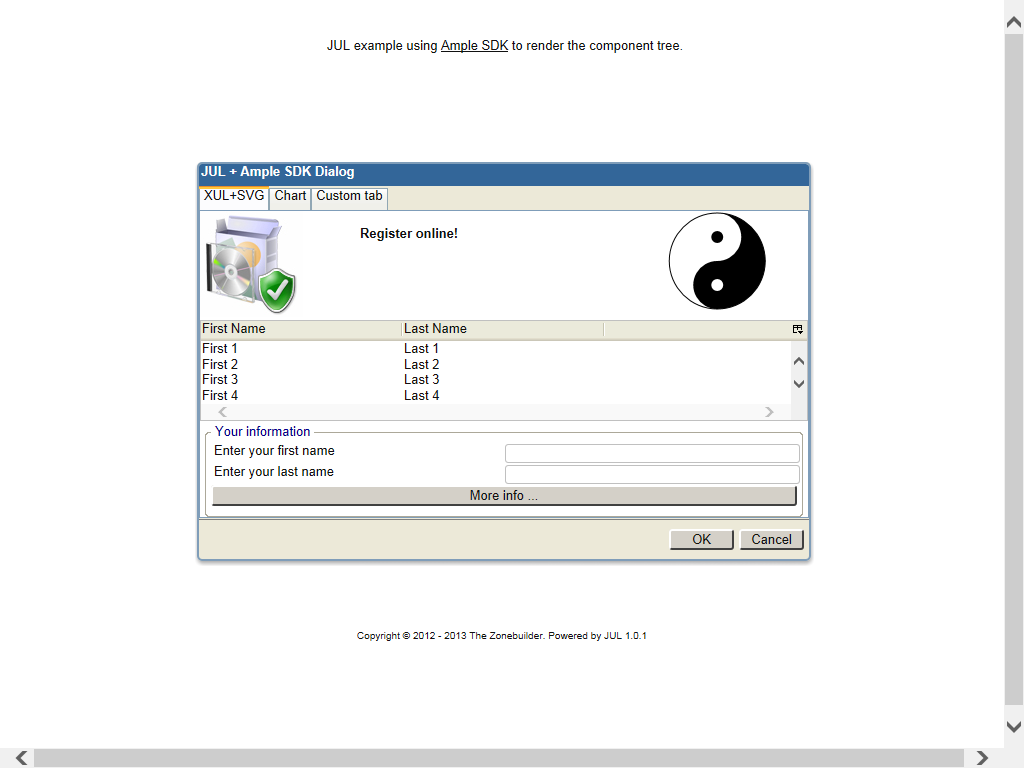 Source code:
// define application namespace
JUL.ns('APP.ui');
JUL.apply(APP, {
	version: '1.0'
});

// build the config tree for the main XUL dialog
APP.ui.components = {
	tag: 'dialog',
	// a dotted ID means publishing the component under that namespace
	id: 'APP.mainWindow',
	title: 'JUL + Ample SDK Dialog',
	css: 'main-dialog',
	width: 610,
	height: 333,
	buttons: 'accept,cancel',
	context: 'none',
	hidden: true,
	commandset: [
		{tag: 'command', id: 'cmd-more-info', label: 'More info ...'}
	],
	children: [
		{tag: 'tabbox', selectedIndex: 0, tabs: [
			{tag: 'tab', label: 'XUL+SVG'},
			{tag: 'tab', label: 'Chart'},
			{tag: 'tab', label: 'Custom tab'}
		]}
	]
};

// preparing an array of items for the listbox config
var aItems = [];
	for (var n = 1; n < 11; n++) {
		aItems.push({tag: 'listitem', children: [
			{tag: 'listcell', label: 'First ' + n},
			{tag: 'listcell', label: 'Last ' + n}
		]});
	}

// add all tabpanel configs
APP.ui.components.children[0].tabpanels = [{
	tag: 'tabpanel',
	orient: 'vertical',
	// using compact form for a DOM config tree - where container elements can be 'members' properties
	hbox: [
		{tag: 'image', src: '../media/shield.jpg'},
		{tag: 'description', value: 'Register online!', style: 'font-weight:bold;padding:15px', flex: 1},
		// container for the SVG tree
		{xclass:'html', tag: 'div', id: 'APP.svgBox'}
	],
	// using default 'members' property i.e. 'children'
	children: [
		{tag: 'listbox', id: 'list-names', seltype: 'single', height: 99, listhead: [
			{tag: 'listheader', label: 'First Name', width: 200, tooltiptext: 'First Name'},
			{tag: 'listheader', label: 'Last Name', width: 200, tooltiptext: 'Last Name'}
		],
		// assign listbody to the array constructed before
		listbody: aItems
		}
	],
	groupbox: [
		{tag: 'caption', label: 'Your information'},
		{tag: 'vbox', children: [
			{tag: 'hbox', children: [
				{tag: 'label', control:'register-firstname', value: 'Enter your first name', flex: 1},
				{tag: 'textbox', id: 'register-firstname', flex: 1}
			]},
			{tag: 'hbox', children: [
				{tag: 'label', control: 'register-lastname', value: 'Enter your last name', flex: 1},
				{tag: 'textbox', id: 'register-lastname', flex: 1}
			]},
			{tag: 'hbox', children: [
				{tag: 'button', command: 'cmd-more-info', flex: 1}
			]}
		]}
	]
}, {
	tag: 'tabpanel',
	orient: 'vertical',
	children: [
		// container for the Ample Chart tree
		{xclass:'html', tag: 'div', id: 'APP.chartBox'}
	]
}, {
	tag: 'tabpanel',
	// include a config specified by its namespace path
	include: 'APP.ui.customTab',
	// the properties below overwrite those included
	id: 'custom-tab',
	css: 'custom-class',
	orient: 'vertical'
}];

// creating a config object used as included config
APP.ui.customTab = {
	tag: 'tabpanel',
	children: [
		// another inclusion
		{tag: 'description', include: 'APP.ui.copy'}
	],
	groupbox: [
		{tag: 'caption', label:'Content'},
		{include: 'APP.ui.hbox'},
		// the binding property 'cid' is used to link UI with the logic config
		{tag: 'button', cid: 'Button.test', label: 'Test me!'}
	]
};

// this is a logic config - see the correspondence of the property 'Button.test'
APP.test = {
	'Button.test': {
		listeners: {
		// the DOM creating factory also accepts listeners as namespace paths
		click: 'APP.doTest'
	}}
};

// define a listener for the 'Test me!' button
APP.doTest = function() {
	alert('This is a test!');
};

// another member used as included config
APP.ui.hbox = {
	tag: 'hbox',
	children: [
		{tag: 'label', value: 'Left line', flex: 1},
			{tag: 'label', value: 'Right line', flex: 1}
	]
};

// testing HTML entities
APP.ui.copy = {html: '© Copyright Note'};

// this is the logic config for the application UI - see the correspondence between its properties and the component IDs
APP.ui.bindings = {
	// it also supports the inclusion of an array of logic configs
	include: ['APP.test'],
	'APP.mainWindow': {listeners: {
		// inline listeners for the main dialog
		dialogaccept: function() {
			alert('Please fill the required info!');
			return false;
		},
		dialogcancel: function() {
			alert("Won't close for now.");
			return false;
		}
	}},
	// listener for the XUL command element
	'cmd-more-info': {listeners: {
		command: function() {
			alert('JUL example with different DOM component trees (XUL, SVG, Ample Chart)');
		}
	}}
};

// SVG config tree
APP.ui.svg = {
	tag: 'svg',
	width: '100px',
	height: '100px',
	viewBox: '0 0 100 100',
	g: [
		{tag: 'circle', cx: 50, cy: 50, r: 48, fill: 'none', stroke: '#000'},
			{tag: 'path', d: 'M50,2a48,48 0 1 1 0,96a24 24 0 1 1 0-48a24 24 0 1 0 0-48'},
			{tag: 'circle', cx: 50, cy: 26, r: 6},
			{tag: 'circle', cx: 50, cy: 74, r: 6, fill: '#FFF'}
		]
};

// Ample Chart config tree
APP.ui.chart = {
	tag: 'bar', title: 'Column chart', orient: 'vertical',
		xAxisLabel: 'X Axis', yAxisLabel: 'Y Label',
		xAxisValueLabels: '1999,2000,2001,2002,2003', children: [
		{tag: 'group', label: 'Set 0', children: [
			{tag: 'item', value: 10},
			{tag: 'item', value: 20},
			{tag: 'item', value: 30},
			{tag: 'item', value: 40},
			{tag: 'item', value: 50}
		]},
		{tag: 'group', label: 'Set 1', children: [
			{tag: 'item', value: 20},
			{tag: 'item', value: 10},
			{tag: 'item', value: 25},
			{tag: 'item', value: 45},
			{tag: 'item', value: 15}
		]},
		{tag: 'group', label: 'Set 2', children: [
			{tag: 'item', value: 30},
			{tag: 'item', value: 30},
			{tag: 'item', value: 5},
			{tag: 'item', value: 10},
			{tag: 'item', value: 40}
		]},
		{tag: 'group', label: 'Set 3', children: [
			{tag: 'item', value: 15},
			{tag: 'item', value: 25},
			{tag: 'item', value: 35},
			{tag: 'item', value: 30},
			{tag: 'item', value: 10}
		]}
	]
};

// change defaults the will be inherited by the new parsers - all will treat configs as DOM element configs
JUL.UI.useTags = true;
// wait for Ample to be ready
ample.ready(function() {
	// new parser for the XUL tree
	var oParser = new JUL.UI.Parser({
		// the 'JUL.UI.createDom' factory as the custom factory
		customFactory: JUL.UI.createDom,
		// all elements created with XUL XML namespace
		defaultClass: 'xul',
		// all of these properties are treated as container configs i.e. parsed for member configs
		membersProperties: ['commandset', 'hbox', 'vbox',
			'groupbox', 'tabs', 'tabpanels', 'listhead', 'listbody'],
		// using the top-down instantiation instead of the default bottom-up one
		topDown: true
	});
	// create the component tree with bounded logic, the root will be published as 'APP.mainWindow'
	// when instantiating top-down, the 'APP.ui.components' needs to be normalized (expanded)
	// in order for the 'JUL.UI.createDom' to create container elements for the compacted members
	oParser.create(oParser.expand(APP.ui.components), APP.ui.bindings);
	// add the DOM element to the Ample document element
	ample.documentElement.appendChild(APP.mainWindow);
	// new parser for the SVG tree
	var oSvgParser = new JUL.UI.Parser({
		customFactory: 'JUL.UI.createDom',
		defaultClass: 'svg',
		membersProperties: ['g']
	});
	var oSvg = oSvgParser.create(APP.ui.svg);
	// 'APP.svgBox' element was published with the creation of the dialog
	APP.svgBox.appendChild(oSvg);
	// new parser for the Ample Chart tree
	var oChartParser = new JUL.UI.Parser({
		customFactory: JUL.UI.createDom,
		defaultClass: 'chart'
	});
	var oChart = oChartParser.create(APP.ui.chart);
	// 'APP.chartBox' element was published with the creation of the dialog
	APP.chartBox.appendChild(oChart);
	// show the main dialog
	APP.mainWindow.show();
});
These were some examples of JUL in action. It can do even more, as we will see in the future posts.
If you are interested, please visit the project page at Sourceforge.







 The Zonebuilder